![Logo.png]](https://knowledgebase.mycomply.net/hs-fs/hubfs/Logo.png?height=40&name=Logo.png)
To set up a form's Required Submitter settings:
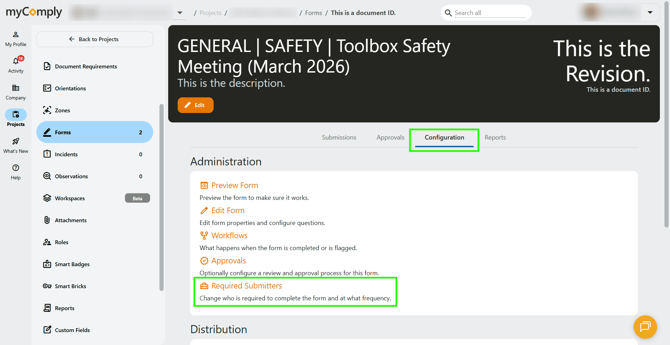
1) Navigate to the form, click on "Configuration". Underneath the Administration section, click on "Required Submitters".
2) You will be able to set:
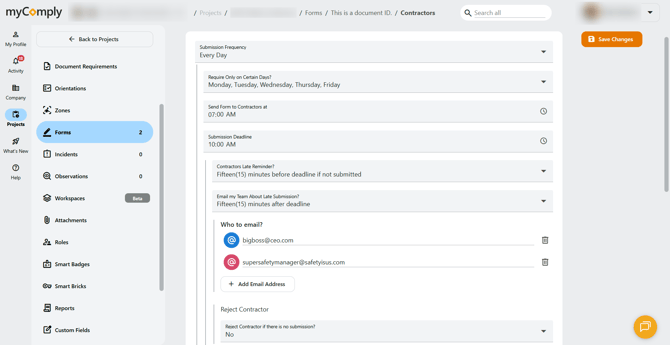
- Submission frequency (including specific days)
- What time forms are sent out and due by.
- Late notifications for the subcontractor/worker.
- Late notifications for specific email addresses (could be internal team members or external).
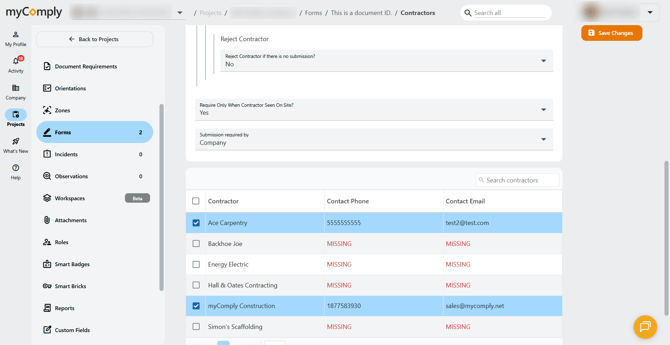
- If a form is not submitted, you can choose to reject that subcontractor and all their workers.
- You can choose to only send forms out when a subcontractor is seen on site.
- You can choose to send to a company contact or specific individuals.
3) Once your settings are complete, click "Save Changes". You will be able to edit these settings throughout the duration of your project.