![Logo.png]](https://knowledgebase.mycomply.net/hs-fs/hubfs/Logo.png?height=40&name=Logo.png)
To send a message to workers on a project:
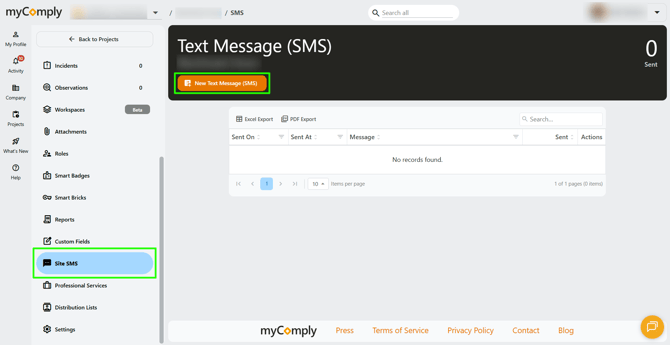
1) Navigate to your project, then click on "Site SMS" in the left menu. Then click "New Text Message (SMS)".
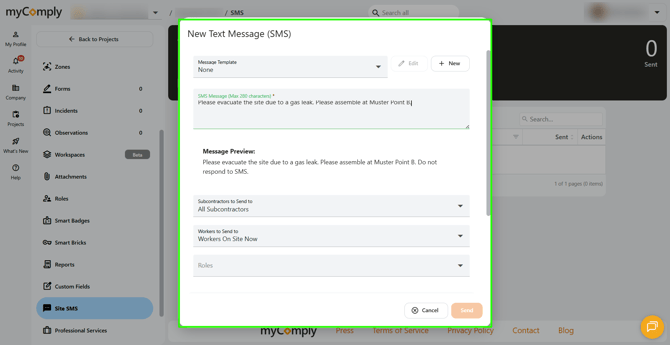
2) A window will open where you can:
- Choose from or create an SMS template.
- Type your message.
- Choose to send your message to all subcontractors or specific subcontractors.
- Send to all approved workers, specific approved workers, workers on site now, workers on site today, or workers on site in the last seven days.
- Specify roles.
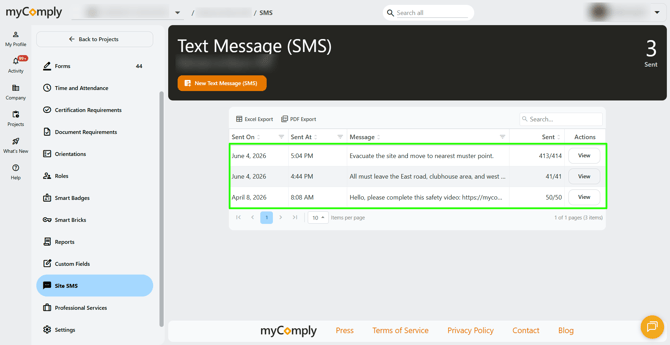
3) The messages will start sending once you click "Send". If you have a large list of workers, it may take several minutes for all of the messages to go out. You will be able to view a history of sent messages in the Site SMS table.
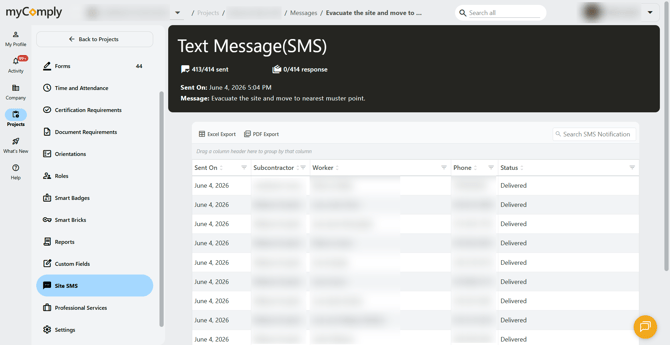
4) If you click "View" next to a sent message, you will be able to see more details including what the message said, who it was sent to, and if there were any unsent messages.
Site SMS can be used for general notifications or for time sensitive matters. Site SMS works well with Mobile Smart Bricks or Smart Bricks set to act as a Muster Point.